> ## Documentation Index
> Fetch the complete documentation index at: https://docs.semgrep.dev/llms.txt
> Use this file to discover all available pages before exploring further.
# Set up Semgrep Supply Chain with Apache Maven (Java)
**INFO**
Semgrep Supply Chain supports the scanning of Java projects built using Maven or Gradle Wrapper **without the need for lockfiles**. Learn more about [scanning your project without generating a Maven dependency tree](/semgrep-supply-chain/set-up-and-configure#dynamic-dependency-resolution-beta).
Semgrep Supply Chain does not read `pom.xml` files to parse Maven projects. Instead it parses a dependency tree generated by Maven (`mvn`).
The **general steps** to enable Semgrep Supply Chain to correctly parse Maven projects are as follows:
Generate a file outlining the project's dependency tree by adding the following command to your build pipeline:
```bash theme={null}
mvn dependency:tree -DoutputFile=maven_dep_tree.txt
```
For specific steps to add the command into your build pipeline, refer to your CI provider's documentation.
For each `pom.xml` file with dependencies you want to scan, create additional dependency trees in their respective directories. Semgrep Supply Chain can detect and parse them all.
Run the Semgrep workflow, action, or step after the dependency tree or trees have been generated.
**CAUTION**
* Ensure that Maven is installed in the build environment that is used to generate the dependency trees.
* Ensure that you generate dependency trees before running Semgrep.
* This approach works for full scans. It does not work for [diff-aware scans](/deployment/customize-ci-jobs#set-up-diff-aware-scans) because the generated file is not tracked by Git.
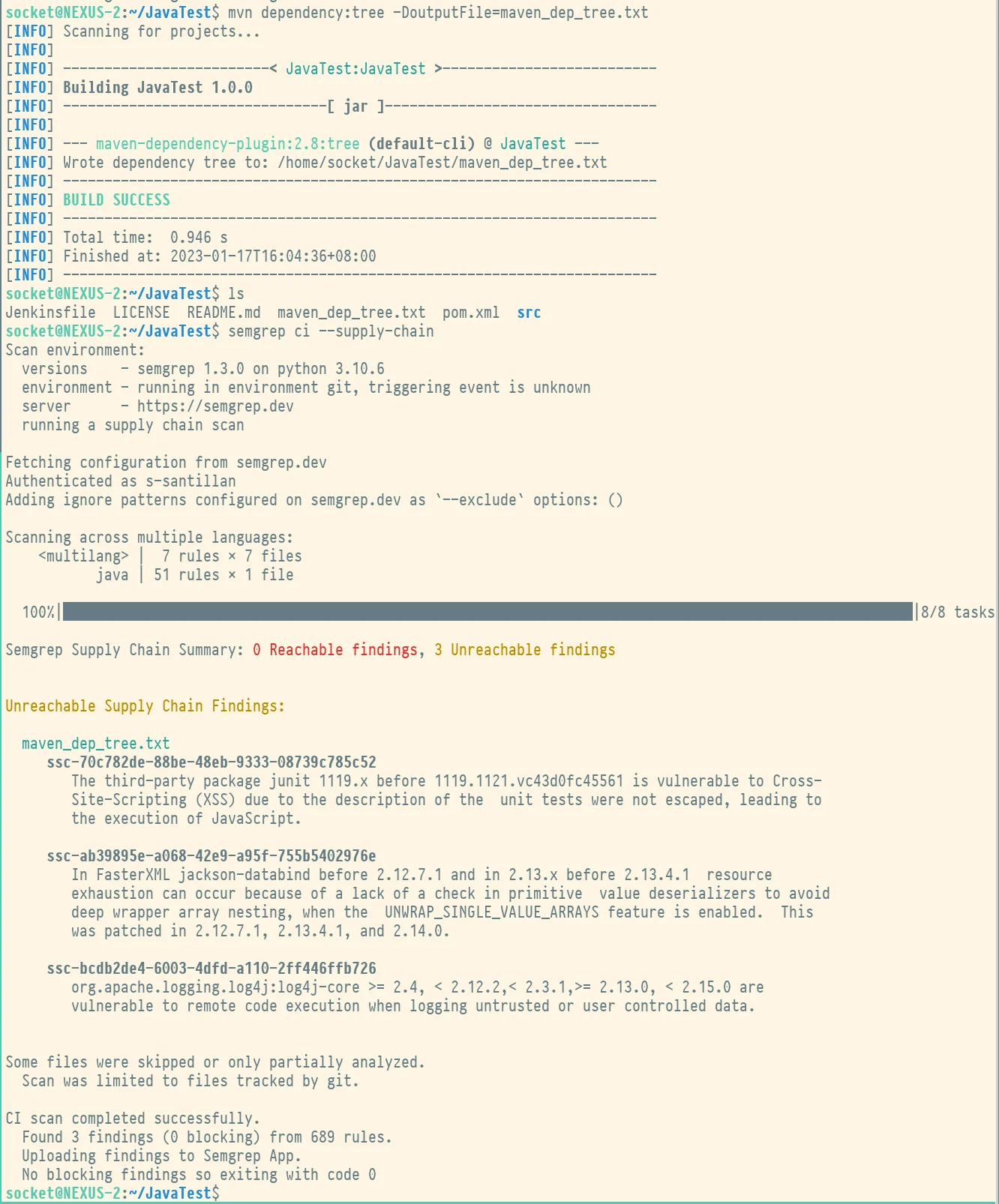
You can perform the general steps in a local environment for testing. The following screenshot displays the commands running in a local environment:
 ## Scanning Apache Maven projects with specific CI providers
This section describes steps to set up Apache Maven with specific CI providers.
## GitHub Actions
To successfully run a Semgrep Supply Chain scan in GitHub Actions, the GitHub Actions workflow must generate all dependency trees in one job and then run Semgrep after.
### Sample GitHub Actions Maven workflow
In the following code snippet, dependency trees are shared between the two jobs through a zip file that gathers all the lockfiles and, in the next job, unzips the lockfiles and runs Semgrep as usual.
```yaml expandable theme={null}
on:
workflow_dispatch:
pull_request: {}
push:
branches:
- master
paths:
- .github/workflows/semgrep.yml
name: Semgrep
jobs:
buildmavenDepTree:
runs-on: ubuntu-latest
steps:
- uses: actions/checkout@v6
- name: Set up JDK 11
uses: actions/setup-java@v3
with:
java-version: '11'
distribution: 'temurin'
- name: Build Dependency Tree
# The mvn command traverses the repository and generates a dependency tree for each pom.xml file
run: mvn dependency:tree -DoutputFile=maven_dep_tree.txt -Dmaven.test.skip=true
- name: Create Zip File
run: find . -type f -name 'maven_dep_tree.txt' -exec zip -r archive.zip {} +
- name: Upload Dependency Zip
uses: actions/upload-artifact@v3
with:
name: zipfile
path: archive.zip
semgrep:
needs: buildmavenDepTree
name: Scan
runs-on: ubuntu-latest
env:
SEMGREP_APP_TOKEN: ${{ secrets.SEMGREP_APP_TOKEN }}
container:
image: semgrep/semgrep
steps:
- uses: actions/checkout@v6
- name: Download artifact from the previous job
uses: actions/download-artifact@v3
with:
name: zipfile
- name: Semgrep Scan
run: |
unzip -o archive.zip
semgrep ci
```
The following code snippet is intended for repositories with a single `pom.xml` file.
```yaml expandable theme={null}
on:
workflow_dispatch:
pull_request: {}
push:
branches:
- main
paths:
- .github/workflows/semgrep.yml
name: Semgrep
jobs:
buildmavenDepTree:
runs-on: ubuntu-latest
steps:
- uses: actions/checkout@v6
- name: Set up JDK 17
uses: actions/setup-java@v3
with:
java-version: '17'
distribution: 'temurin'
- name: Build with Maven
run: mvn --batch-mode --update-snapshots package
- name: Build Dependency Tree
run: mvn dependency:tree -DoutputFile=maven_dep_tree.txt
- name: Upload Dependency Tree Artifact
uses: actions/upload-artifact@v3
with:
name: mavendeptree
path: maven_dep_tree.txt
semgrep:
needs: buildmavenDepTree
name: Scan
runs-on: ubuntu-latest
env:
SEMGREP_APP_TOKEN: ${{ secrets.SEMGREP_APP_TOKEN }}
container:
image: semgrep/semgrep
steps:
- uses: actions/checkout@v6
- name: Download artifact from previous job
uses: actions/download-artifact@v3
with:
name: mavendeptree
- run: semgrep ci
```
To **request support for your CI provider**, join the [Semgrep Community Slack](https://go.semgrep.dev/slack) group to ask the maintainers and the community.
## Scanning Apache Maven projects with specific CI providers
This section describes steps to set up Apache Maven with specific CI providers.
## GitHub Actions
To successfully run a Semgrep Supply Chain scan in GitHub Actions, the GitHub Actions workflow must generate all dependency trees in one job and then run Semgrep after.
### Sample GitHub Actions Maven workflow
In the following code snippet, dependency trees are shared between the two jobs through a zip file that gathers all the lockfiles and, in the next job, unzips the lockfiles and runs Semgrep as usual.
```yaml expandable theme={null}
on:
workflow_dispatch:
pull_request: {}
push:
branches:
- master
paths:
- .github/workflows/semgrep.yml
name: Semgrep
jobs:
buildmavenDepTree:
runs-on: ubuntu-latest
steps:
- uses: actions/checkout@v6
- name: Set up JDK 11
uses: actions/setup-java@v3
with:
java-version: '11'
distribution: 'temurin'
- name: Build Dependency Tree
# The mvn command traverses the repository and generates a dependency tree for each pom.xml file
run: mvn dependency:tree -DoutputFile=maven_dep_tree.txt -Dmaven.test.skip=true
- name: Create Zip File
run: find . -type f -name 'maven_dep_tree.txt' -exec zip -r archive.zip {} +
- name: Upload Dependency Zip
uses: actions/upload-artifact@v3
with:
name: zipfile
path: archive.zip
semgrep:
needs: buildmavenDepTree
name: Scan
runs-on: ubuntu-latest
env:
SEMGREP_APP_TOKEN: ${{ secrets.SEMGREP_APP_TOKEN }}
container:
image: semgrep/semgrep
steps:
- uses: actions/checkout@v6
- name: Download artifact from the previous job
uses: actions/download-artifact@v3
with:
name: zipfile
- name: Semgrep Scan
run: |
unzip -o archive.zip
semgrep ci
```
The following code snippet is intended for repositories with a single `pom.xml` file.
```yaml expandable theme={null}
on:
workflow_dispatch:
pull_request: {}
push:
branches:
- main
paths:
- .github/workflows/semgrep.yml
name: Semgrep
jobs:
buildmavenDepTree:
runs-on: ubuntu-latest
steps:
- uses: actions/checkout@v6
- name: Set up JDK 17
uses: actions/setup-java@v3
with:
java-version: '17'
distribution: 'temurin'
- name: Build with Maven
run: mvn --batch-mode --update-snapshots package
- name: Build Dependency Tree
run: mvn dependency:tree -DoutputFile=maven_dep_tree.txt
- name: Upload Dependency Tree Artifact
uses: actions/upload-artifact@v3
with:
name: mavendeptree
path: maven_dep_tree.txt
semgrep:
needs: buildmavenDepTree
name: Scan
runs-on: ubuntu-latest
env:
SEMGREP_APP_TOKEN: ${{ secrets.SEMGREP_APP_TOKEN }}
container:
image: semgrep/semgrep
steps:
- uses: actions/checkout@v6
- name: Download artifact from previous job
uses: actions/download-artifact@v3
with:
name: mavendeptree
- run: semgrep ci
```
To **request support for your CI provider**, join the [Semgrep Community Slack](https://go.semgrep.dev/slack) group to ask the maintainers and the community.