> ## Documentation Index
> Fetch the complete documentation index at: https://docs.semgrep.dev/llms.txt
> Use this file to discover all available pages before exploring further.
# Enable Bitbucket Data Center pull request comments
**YOUR DEPLOYMENT JOURNEY**
* You have gained the necessary [resource access and permissions](/deployment/checklist) required for deployment.
* You have [created a Semgrep account and organization](/deployment/create-account-and-orgs).
* You have [connected your source code manager](/deployment/connect-scm).
* Optionally, you have [set up SSO](/deployment/sso).
* You have successfully added a [Semgrep job](/deployment/add-semgrep-to-ci) to your CI workflow with [diff-aware scanning](/deployment/customize-ci-jobs/#set-up-diff-aware-scans).
Semgrep can create **pull request (PR) comments** in your Bitbucket repository. These comments provide a description of the issue detected by Semgrep and may offer possible solutions. They are a means for security teams, or any team responsible for creating standards to help their fellow developers write safe and standards-compliant code.
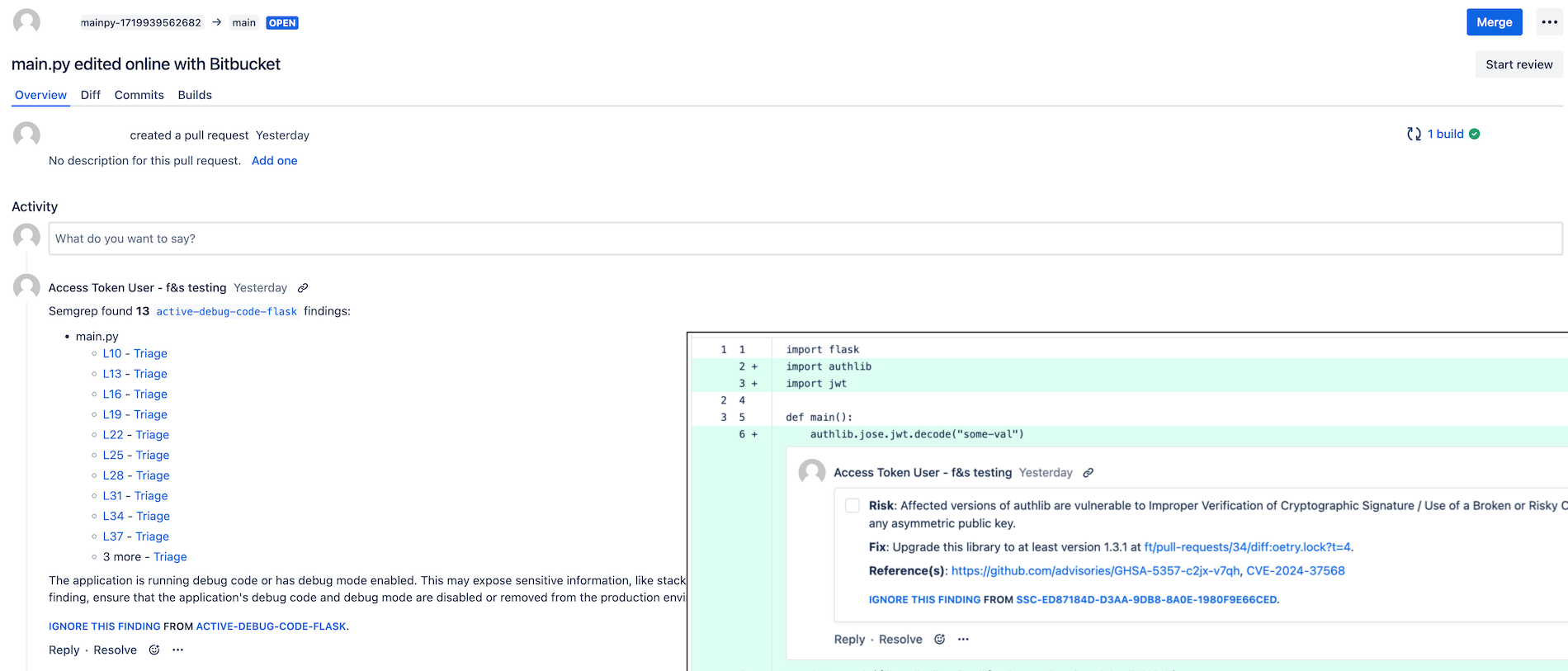
Automated comments on Bitbucket pull requests are displayed as follows:
 ## Conditions for PR comment creation
PR comments appear for the following types of scans under these conditions:
| Type of scan | Product name | Trigger condition | How to set up |
| :----------------------------------------- | :------------------------- | :---------------------------------------------------------------------------------------------------------------------------------------------------------------------------------------------------------------- | :--------------------------------------------------------------------------------------------------------------------------------------------------------------------------------------------------------------------------------------------------------------------------------------------------------------------------------------------------------- |
| Static application security testing (SAST) | Semgrep Code | A comment appears when a finding is generated by a rule in **Comment or Block mode**. This means you can fully customize what comments your developers receive. | Complete the steps in the following sections:
## Conditions for PR comment creation
PR comments appear for the following types of scans under these conditions:
| Type of scan | Product name | Trigger condition | How to set up |
| :----------------------------------------- | :------------------------- | :---------------------------------------------------------------------------------------------------------------------------------------------------------------------------------------------------------------- | :--------------------------------------------------------------------------------------------------------------------------------------------------------------------------------------------------------------------------------------------------------------------------------------------------------------------------------------------------------- |
| Static application security testing (SAST) | Semgrep Code | A comment appears when a finding is generated by a rule in **Comment or Block mode**. This means you can fully customize what comments your developers receive. | Complete the steps in the following sections:
1. [Confirm your Semgrep account's connection and access to your source code manager](#confirm-your-semgrep-accounts-connection).
2. [Configure comments for Semgrep Code](#configure-comments-for-semgrep-code). |
| Software composition analysis (SCA) | Semgrep Supply Chain (SSC) | A comment appears based on the conditions you explicitly set in a [Supply Chain policy](/semgrep-supply-chain/policies) or when Semgrep detects a [license violation](/semgrep-supply-chain/license-compliance). | To receive Supply Chain comments, complete the steps in [Confirm account connection and access](#confirm-your-semgrep-accounts-connection) and [set up a policy](/semgrep-supply-chain/policies).
To receive license violation comments, [enable dependency search](/semgrep-supply-chain/dependency-search#enable-and-use-dependency-search). |
| Secrets | Semgrep Secrets | A comment appears when a finding is generated by a rule in **Comment or Block mode**. A comment also appears for invalid findings and validation errors if these conditions are set to **Comment or Block mode**. | Complete the steps in the following sections:
1. [Confirm your Semgrep account's connection and access to your source code manager](#confirm-your-semgrep-accounts-connection).
2. [Configure comments for Semgrep Secrets](#configure-comments-for-semgrep-secrets). |
Comments from Supply Chain scans include the following information:
**Risk**
A description of the vulnerability, including the types of attack it is vulnerable to.
**Fix**
Indicates what versions to upgrade to, if any, that resolves or eliminates the vulnerability.
**Reference**
A link to additional information about the vulnerability from its source, such as the [GitHub Advisory Database](https://github.com/advisories) and the [National Vulnerability Database (NVD)](https://nvd.nist.gov/vuln), if available.
## Enable PR comments in Bitbucket
### Prerequisites
* You must have a Bitbucket Data Center HTTP access token. Ensure that the [HTTP access token that you create](https://confluence.atlassian.com/bitbucketserver/http-access-tokens-939515499.html) has been granted **Project write** permissions. You'll provide this token to your CI provider during the setup process.
* Semgrep has been tested with Bitbucket Data Center v8.19. If you are using a different version of BBDC and there are issues, please [reach out to support](/support).
### Confirm your Semgrep account's connection
Confirm that you have the correct connection and access:
In your Semgrep AppSec Platform account, click **Settings > Source code managers**.
Check that an entry for your Bitbucket project exists and is correct.
#### Triage through PR comments
Developers can triage Semgrep findings without leaving Bitbucket by responding to the PR comments authored by Semgrep. Semgrep requires Bitbucket Data Center source code manager (SCM) connections to use an HTTP access token with **Project admin** permissions, so your connection may already use an appropriate token.
If you do not, to update your connection between Semgrep and Bitbucket Data Center:
Ensure that you're using Bitbucket Data Center version 8.8 or later.
Log in to Bitbucket using an account assigned with the **Project Admin** role.
See [Bitbucket Data Center HTTP access token requirements](/deployment/managed-scanning/bitbucket#bitbucket-data-center) to create or update your token.
Return to Semgrep and [ sign in](https://semgrep.dev/login).
Go to ** Settings > Source code managers**, and find your Bitbucket connection.
Click **Update access token**.
In the **Update access token** dialog that appears, provide the new token you created. Click **Update** to save and proceed.
Toggle the **Incoming webhooks** setting on.
Once you've successfully enabled webhooks and the **Triage via code review comments** toggle is on, developers can triage Semgrep findings from Bitbucket Data Center.
### Configure comments for Semgrep Code
In addition to setting up the connection between Semgrep and Bitbucket, you must assign rules to Comment or Block mode. This customization enables you to:
* Manage the amount of PR comments your developers receive.
* Ensure that only rules that meet your criteria, such as high severity or high confidence rules, produce comments visible to developers, reducing noise.
#### Set rules to Comment or Block mode
The following instructions let you customize what findings or security issues your developers see as comments in their PRs:
In your Semgrep AppSec Platform account, click **Rules > Policies** to enter the **Policies** page. Under **Modes **, you can quickly see if you have existing rules in either Comment or Block mode.
Optional: To configure Semgrep Secrets rules, click the **Secrets** tab.
Optional: Use the filters to quickly find rules to set to Comment or Block.
Click the ** checkbox** of the rules you want to set. You can use Ctrl + Click to select rules in bulk.
Click **Change modes**.
Click either **Block** or **Comment**.
You have successfully configured PR comments for Semgrep Code.
**TIP**
Rules in Block mode fail the CI job that runs on the PR. Depending on your workflow, this may prevent your PR from merging.
### Configure comments for Semgrep Secrets
In addition to setting up the connection between Semgrep and Bitbucket, you must assign rules to Comment or Block mode. This customization enables you to:
* Manage the amount of PR comments your developers receive.
* Ensure that only rules that meet your criteria, such as high severity or high confidence rules, and result in findings involving valid secrets produce comments visible to developers, reducing noise.
#### Set rules to Comment or Block mode
The following instructions let you customize what findings or security issues your developers see as comments in their PRs:
In Semgrep AppSec Platform, go to **Rules > Policies > Secrets**.
Under **Modes **, you can see if you have existing rules in either Comment or Block mode. You can also use the filters to find rules you want to set to Comment or Block.
Click the ** checkbox** of the rules you want to set. You can use Ctrl + Click to select rules in bulk.
Click **Change modes**.
Click either **Block** or **Comment**.
You have successfully configured PR comments for Semgrep Secrets.
#### Validation state policies
Validation state policies allow you to define how Semgrep handles the following issues:
* **Invalid findings**: the secret has been revoked, was never functional, or used for a custom or private endpoint that Semgrep cannot communicate with. For example, a Semgrep rule that tests GitHub credentials may return an invalid finding if Semgrep cannot communicate with an on-premise deployment.
* **Validation errors**: Semgrep was unable to reach the secrets provider to test the validity of the credential, or Semgrep received an unexpected response from the API
To edit the policy for invalid secrets and errors:
In Semgrep AppSec Platform, go to **Rules > Policies > Secrets**.
Click **Validation State Policies**.
Choose the mode, either Comment or Block, that you want Semgrep to set for **Invalid findings**.
Choose the mode, either Comment or Block, that you want Semgrep to set for **Validation errors**.
**TIP**
Rules in Block mode fail the CI job that runs on the PR. Depending on your workflow, this may prevent your PR from merging.
### Configure comments for Semgrep Supply Chain
To configure comments for Supply Chain, you must define a Supply Chain policy. This policy lets you set the specific conditions, such as transitivity and reachability, that trigger a comment. These conditions are unique to Supply Chain findings.
See the [Policies documentation](/semgrep-supply-chain/policies) for more information.
## Optional features
### Customize PR comments
You can customize the comments Semgrep leaves on your PR. Custom comments allow you to direct your teams to the resources they need to handle the vulnerabilities Semgrep identifies in their code.
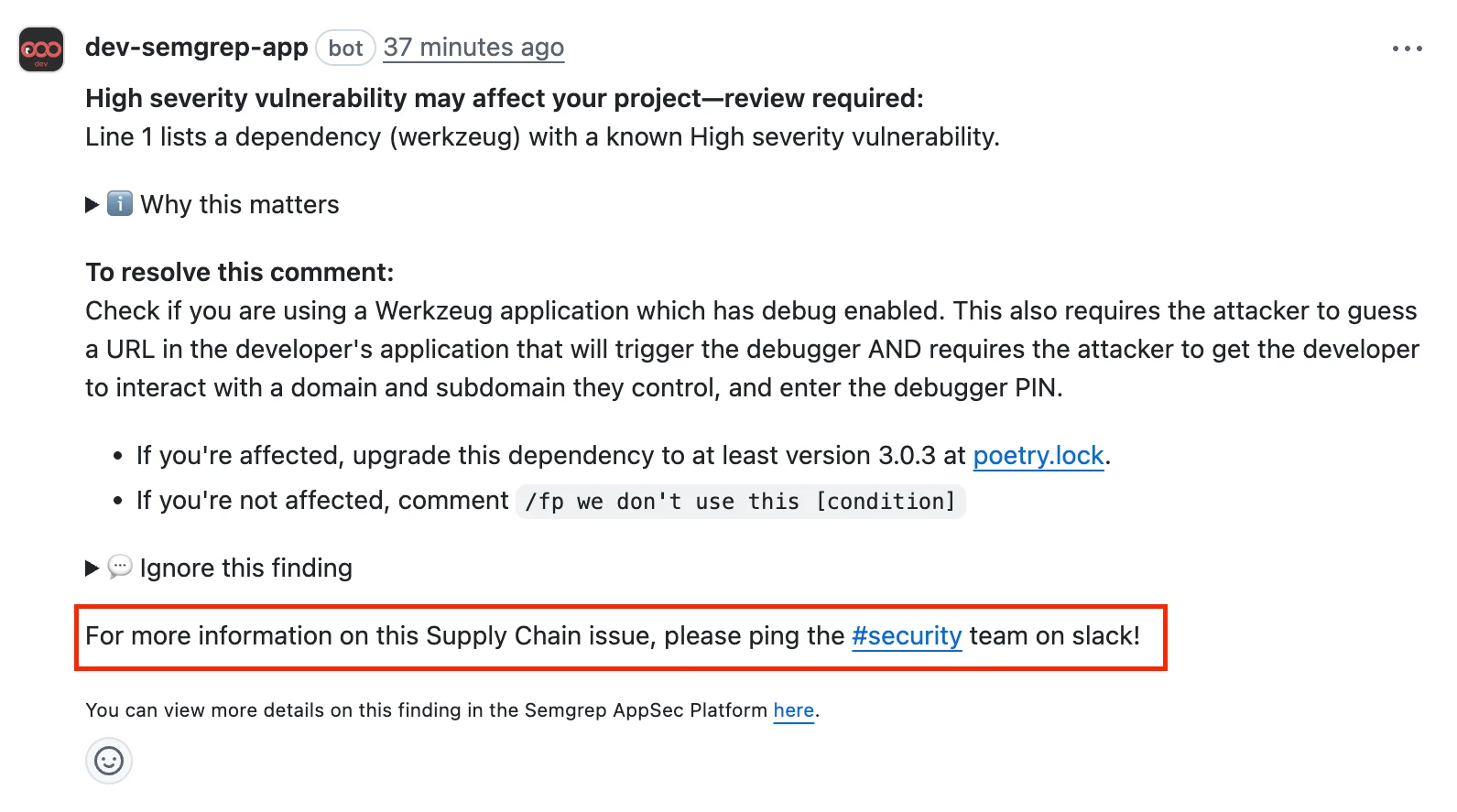 To provide custom PR comments:
Sign in to [ Semgrep AppSec Platform](https://semgrep.dev/login?).
Navigate to **Settings > General > Global**.
Go to the **Custom PR/MR comments footers** section.
To provide custom PR comments:
Sign in to [ Semgrep AppSec Platform](https://semgrep.dev/login?).
Navigate to **Settings > General > Global**.
Go to the **Custom PR/MR comments footers** section.
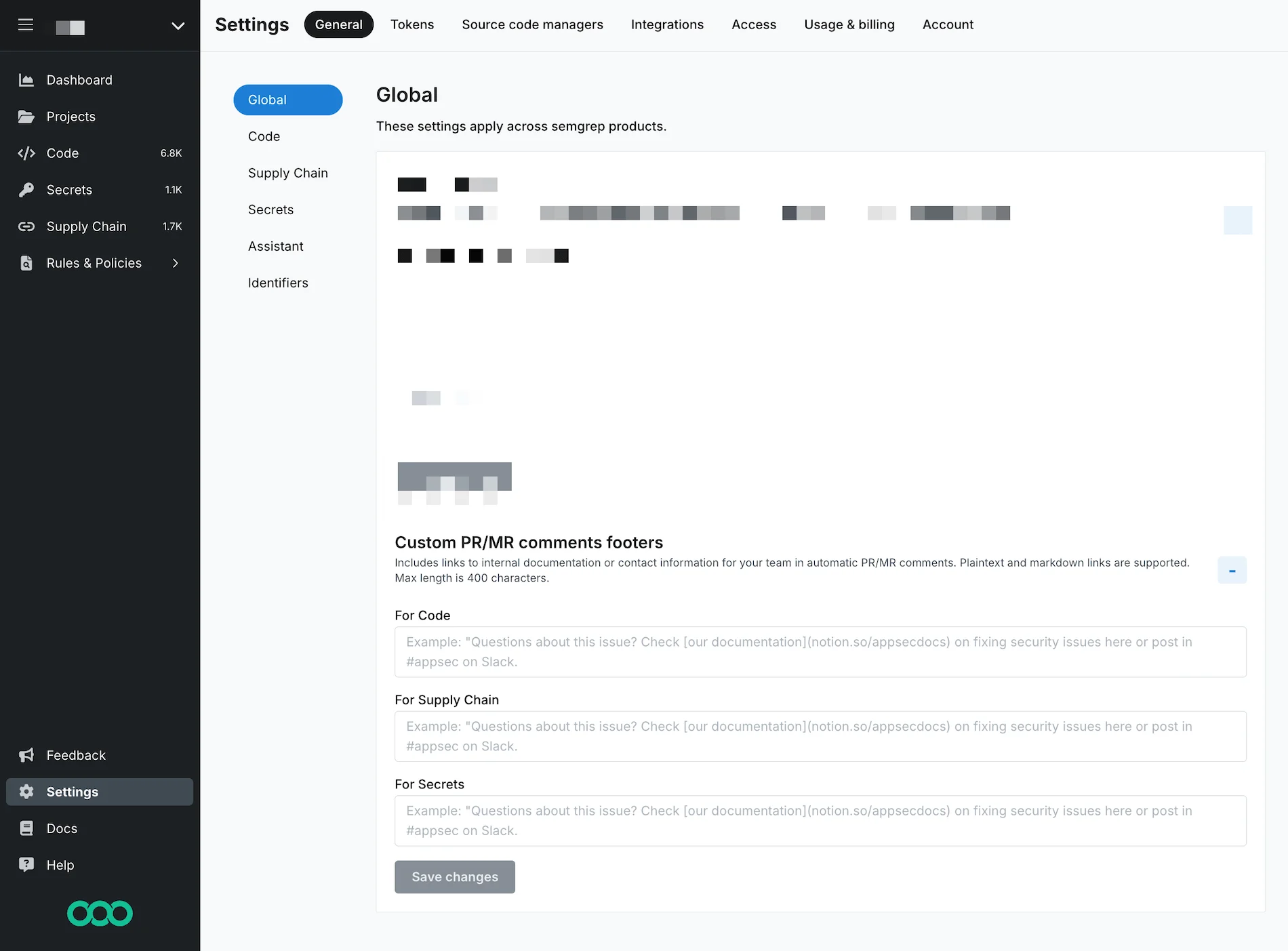 Provide a custom comment for each Semgrep product whose findings you want to generate a PR comment. Semgrep supports Markdown and plaintext links in your message.
Click **Save changes**.
### Enable Rule-defined fix in Bitbucket Data Center repositories
[Autofix](/writing-rules/rule-defined-fix) is a Semgrep feature in which rules contain suggested fixes to resolve findings.
To enable **Rule-defined fix** for all projects in your Semgrep AppSec Platform organization, follow these steps:
In Semgrep AppSec Platform, go to **Settings > General > Code**.
Use the **Rule-defined fix ** toggle to enable this feature.
## Next steps
You've finished setting up a core deployment of Semgrep 🎉.
* Explore recommended tasks after deployment in [ Beyond core deployment](/deployment/beyond-core-deployment).
## Additional references
Provide a custom comment for each Semgrep product whose findings you want to generate a PR comment. Semgrep supports Markdown and plaintext links in your message.
Click **Save changes**.
### Enable Rule-defined fix in Bitbucket Data Center repositories
[Autofix](/writing-rules/rule-defined-fix) is a Semgrep feature in which rules contain suggested fixes to resolve findings.
To enable **Rule-defined fix** for all projects in your Semgrep AppSec Platform organization, follow these steps:
In Semgrep AppSec Platform, go to **Settings > General > Code**.
Use the **Rule-defined fix ** toggle to enable this feature.
## Next steps
You've finished setting up a core deployment of Semgrep 🎉.
* Explore recommended tasks after deployment in [ Beyond core deployment](/deployment/beyond-core-deployment).
## Additional references